
Patch Management.
Yes it’s a thankless and impossible task but that’s not a reason to give up.
Here in the UK, if you want to meet requirements of the NCSC backed Cyber Essentials Plus scheme you need to be using in-support operating system versions and patch critical and high rated vulnerabilities in applications and software within 14 days.
If you have less than 50 endpoints that all run Windows 10/11 this target is much easier than if you have thousands of smart phones, tablets, laptops, desktops, and servers all running different operating systems across Windows, Linux and Apple. This still does not take into account all the other equipment that also needs to be updated in an enterprise environment, and we haven’t even mentioned any cloud infrastructure yet!
Just pushing out patches or updates and hoping for the best is not a viable plan, you need to be looking at your progress on a daily basis and actively looking to repair issues or problem devices as part of your business as usual (BAU). Patches across products are released almost constantly throughout any given month so focusing on “Patch Tuesday” and working towards having it completed before next month is a flawed strategy in my opinion. These types of targets also do not take into account any operational risk faced by your organisation, so understanding this is also critical. Blindly updating to meet arbitrary targets can cause availability issues in a similar way that a cyber attack could. This does not mean do not patch, it simply means you need to understand the organisation and its requirements as with any other IT decision.
Focusing on the number patched at the end of each month will not help you identify issues in the patching process or help improve the current process. If you find yourself uttering the phrase “another patch, but I only just did the last one” then you have the wrong mind-set by not treating patching as an ongoing process, more a series of month-long sprints to the finish. The overall goal is not patch compliance, it is to continually reduce the attack surface of your IT environment by applying patches or remediations to known vulnerabilities.
Below are the 10 steps you should try and incorporate into your patch management process.
Identify your organisation’s scope
Identify all the devices in your organisation that require updating and patching.
Patching and updating does not only apply to operating systems, it also applies to software, applications, drivers and firmware. It is also not exclusive to Windows laptops and smart phones, you should also be updating other IT equipment such as printers, switches, routers, firewalls, CCTV/IP cameras and wireless access points.
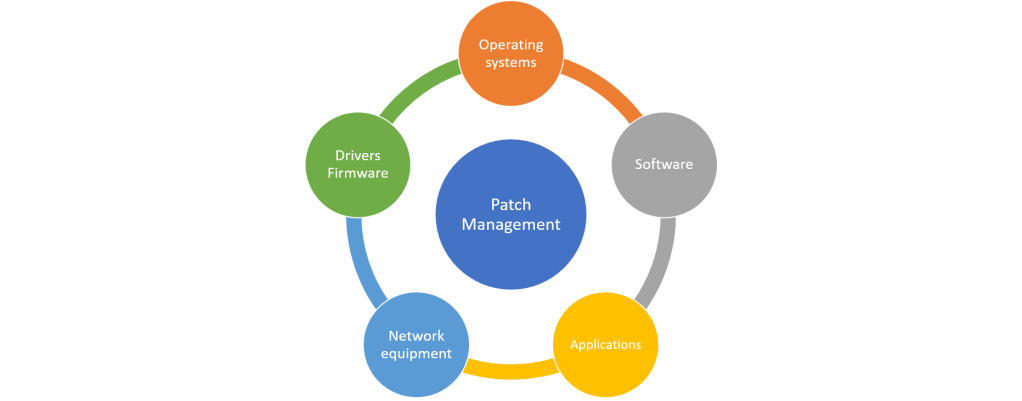
Patch and Update Severity Categories
Understand the patches you will be applying, and why.
Not all patches and updates are equal, some are needed now, and some may simply not be needed. The most important ones to pay attention to are critical and high updates which address security vulnerabilities across all devices in use. This is not to say you can’t enable automatic updates, but if you do, understand what updates are auto-approved and applied, don’t ignore all information just because you are updating automatically, you should still have a clear view of what is being updated.

Effective Patch Management
Ensure the process is effective, and is regularly reviewed.
Although rare, patches and updates can break endpoints, devices and systems. Patch management should not be viewed as a task which is started and completed, it should be a continual process conducted as business as usual. Understand that new patches and updates are released every week across the many vendors so we need to make sure the continual process is effective and well managed rather than focusing on a specific patch which needs to be installed. Better to have an emergency patch process in place should it be required for anything which is of particular concern to your organisation. It’s important to understand any gaps or issues with the current patching process, you can’t be perfect all the time, or ever, so understand your limitations and don’t set yourself unrealistic targets that you know you can never meet.

Patch Management Life Cycle
Each patch has a life cycle, ensure you understand its journey to success or failure.
Each patch and update has a life cycle which should follow the steps in the graphic. Each step will be covered in more detail below.
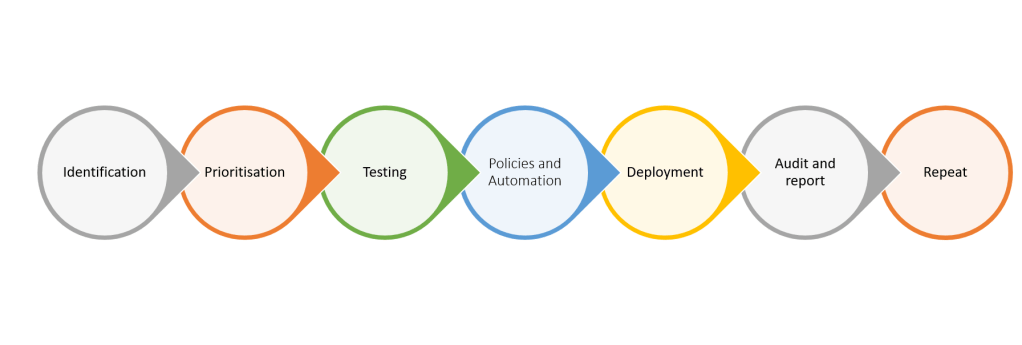
IDENTIFICATION
We can become aware that a patch is required by many different avenues, we need to ensure we are aware of what devices, software and applications etc. are in use and how we will become aware of them. Identify by which channel you will become aware of vulnerabilities and that they are reliable. We also need to understand the type and severity of the patches or updates.

PRIORITISATION
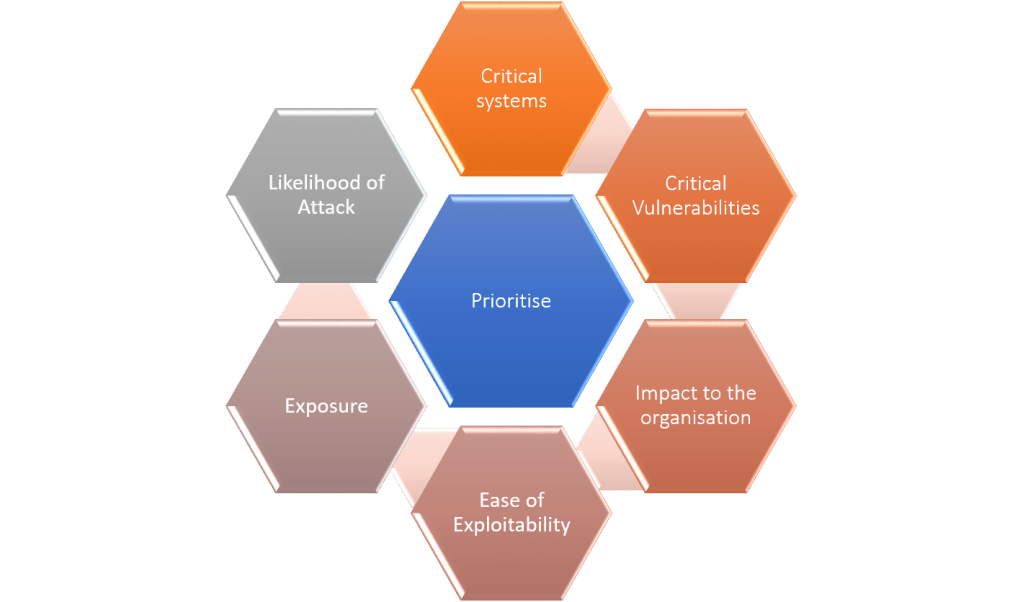
Once a patch or update has been identified as relevant, we need to prioritise them based on some of the conditions listed here. Critical systems and critical patches should be given priority.
TESTING AND AVOIDING ISSUES
Before any patch is rolled out we want to conduct some testing to reduce the likelihood of issues which could affect business activities. Even for patches from vendors with good reputations for not causing issues we want to apply to a test group initially and monitor for a short period. This may not be possible or practical for all patches, but certainly patches for critical systems should be tested to avoid impact to availability. There should also be a roll back plan should issues occur.

POLICIES AND AUTOMATION
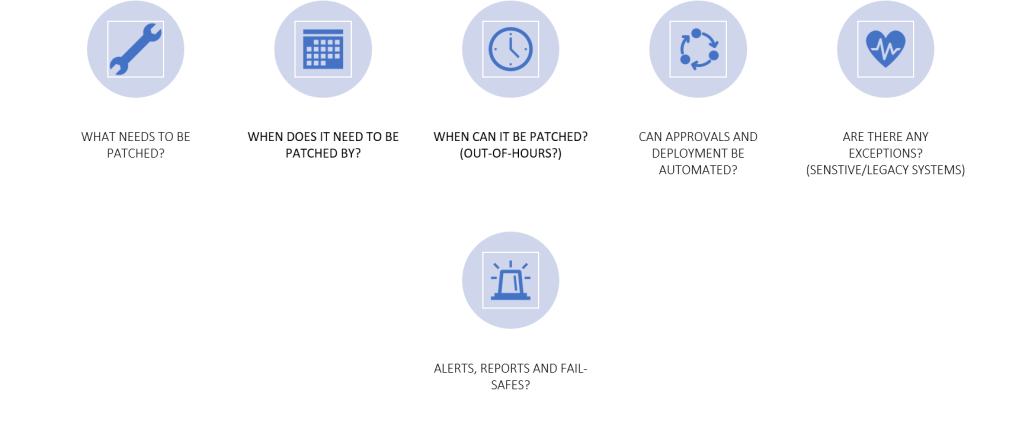
Based on prioritisation and testing we can automate patches using systems designed to apply patches in bulk within enterprise environments or simply configure devices to apply updates automatically to reduce administrative overhead. Some patches can only be applied out of hours so additional considerations may be necessary.
DEPLOYMENT
When patches are being deployed, progress should be monitored, and communicated to end users when required.

AUDIT AND REPORT
Where critical patches or updates cannot be applied or when issues are seen and they require additional investigation and testing before they can be pushed out, this should be recorded and tracked. With the constant stream of updates it is easy to forget about critical updates if not applied. Ensure you can report on patch compliance to identify missing patches and if necessary apply mitigating controls to reduce the risk or complete a risk assessment which is passed to senior stakeholders if it concerns a critical vulnerability in a critical system. Adding something to a risk register does not remediate a risk, you still need to work towards remediating it or applying a compensatory control.
Don’t forget, the overall goal is not patch compliance, it is to continually reduce the attack surface of your IT environment by applying patches or remediations to known vulnerabilities.
Cyber Security is easy, right?
 @2codemonte