

As we have covered previously, if you are a using Microsoft products and services a vast amount of guidance and documentation is available online. This can get confusing as there is the Cloud Adoption Framework, Azure Well-Architected Framework, Microsoft Cybersecurity Reference Architecture, Microsoft Cloud Security Benchmark, and the new Security Adoption Framework (SAF).
This guide will cover the Microsoft Cybersecurity Reference Architecture (MCRA), and Microsoft Cloud Security Benchmark (MCSB), and help us understand each a little better and their use cases, before moving on to cover the new Security Adoption Framework (SAF) in an upcoming guide.
When thinking about our IT environment we want to be considering not only detective controls to detect and respond to incidents, but also secure by design principles, and defensive controls to proactively prevent security incidents before they occur.
The Microsoft Cloud Security Benchmark
The MCSB (previously known as the Azure Security Benchmark – ASB) is broken into 12 sections and is available as a downloadable spreadsheet here.
- Network security
- Identity management
- Privileged access
- Data protection
- Asset management
- Logging and threat detection
- Incident response
- Posture and vulnerability management
- Endpoint security
- Backup and recovery
- DevOps security
- Governance and strategy
Each section contains subsections of prescriptive controls aligned to best practice and recommendations from Microsoft and industry guidance. Examples include the Amazon Web Services (AWS) Well-Architected Framework, Center for Internet Security (CIS) Controls, National Institute of Standards and Technology (NIST), and Payment Card Industry Data Security Standard (PCI-DSS).
The MCSB is a multi-cloud security framework that also provides control mappings between MCSB and industry benchmarks (such as CIS, NIST, and PCI).
The screen shot below provides a glimpse of the spreadsheet, and the kind of details that are included for each control domain.

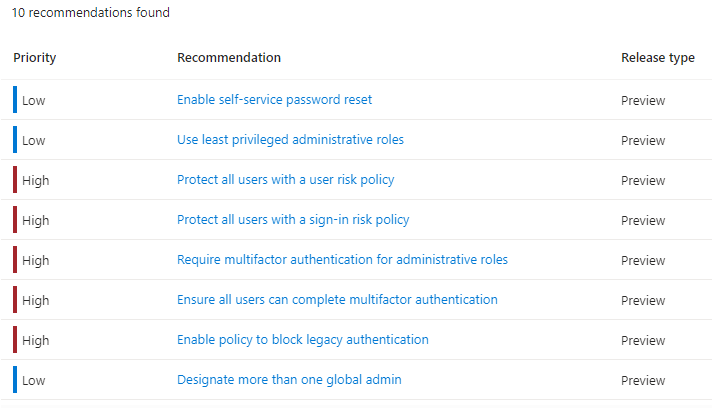
The recommendations we see when using the Azure portal are aligned to the MCSB, as shown below from within the Entra ID page.
The MCSB not only contains technical controls, it also contains governance and strategic recommendations as part of control 12, and consists of the following recommendations.
- Align organization roles, responsibilities and accountabilities
- Define and implement enterprise segmentation/separation of duties strategy
- Define and implement data protection strategy
- Define and implement network security strategy
- Define and implement security posture management strategy
- Define and implement identity and privileged access strategy
- Define and implement logging, threat detection and incident response strategy
- Define and implement backup and recovery strategy
- Define and implement endpoint security strategy
- Define and implement DevOps security strategy
- Define and implement multi-cloud security strategy
Let’s take a quick look at “Define and implement logging, threat detection and incident response strategy” within the spreadsheet.
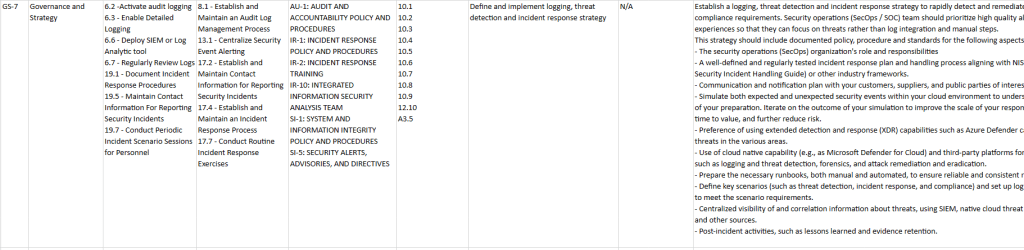
As with the other controls, we get alignment to CIS, NIST and PCI-DSS along with some general implementation guidance.
Microsoft Cybersecurity Reference Architecture
The MCRA is a 65 slide PowerPoint file which instead uses a series of diagrams which demonstrate Microsoft’s security capabilities and how these integrate with not only Microsoft platforms like 365, and Azure, but also 3rd party apps like ServiceNow and salesforce, and 3rd party platforms like Amazon Web Services (AWS) and Google Cloud Platform (GCP).
Not every organisation has cyber architecture experts or can afford to bring in consultants when designing new infrastructure and that is where the MCRA can really help organisations define a target state for their cyber security program. The MCRA can also be used to compare our current state to Microsoft’s recommendations, and in some cases discover we are either not taking full advantage, or are unaware of, functionality available to us within our current licencing model.
Some of the areas covered within the MCRA are.
- Capabilities.
- People.
- Zero Trust.
- Microsoft Native Controls.
- Security Operations.
- Attack Chain Coverage.
- Multi-Cloud and Cross Platform.
- Secure Access Service Edge (SASE).

These are detailed diagrams which relate to the implementation of best practices in the respective areas for both insider and external attack types. The below image covers defending across attack chains, listing defensive capabilities across Microsoft platforms and services and where they interact within an attack chain.

Other diagrams also cover key initiatives we should be undertaking or have in place such as privileged access, modernising remote access, and mitigating ransomware.

In conclusion, whereas the MCSB provides mostly written technical control guides related to specific domains via a spreadsheet list, the MCRA provides technical diagrams for an Enterprise Access Model, a Security Operations Reference Architecture, and the components of a Zero Trust Architecture to name a few.
Boiled down, we would use the MCRA during our design or assessment phase, to define a secure cloud architecture that can be implemented anywhere with any technology stack. Whereas we use the MCSB is to ensure that the required security posture of the implemented cloud architecture is configured and maintained appropriately using its set of recommended security configurations and best practices for Microsoft (and other) cloud services.
 @2codemonte