
In previous series’ and blogs we have covered disabling legacy authentication to protect Exchange Online, Azure and Office 365, however while going through the Microsoft Cloud Security Benchmark and something caught my eye.
“Ensure modern authentication for SharePoint applications is required“
NOTE: We have covered the Cloud Security Benchmark previously, and the blog can be found here.
I thought I had disabled and blocked any use of legacy authentication methods within my tenant, and this came as a surprise. After some reading of Microsoft docs it does appear there is a separate setting to block legacy authentication (such as forms based and basic) being used by SharePoint apps. Modern authentication in Microsoft 365 enables authentication features like multifactor authentication (MFA) using smart cards, certificate-based authentication (CBA), and third-party SAML identity providers.
This again shows how difficult it can be to secure cloud environments as often there are settings ‘hidden’ away which can be easily missed. It also highlights how important it is to take the time to look at best practice guides as often they will highlight things we have not considered or were not aware of.
The significance of this setting is that it is a deviation from our expected baseline and could allow the bypassing of conditional access policies, or MFA as SharePoint apps are not configured to use modern authentication.
As always before enabling this setting we need to check that this will not break custom apps, or other workflows if we are using Office products prior to 2013.
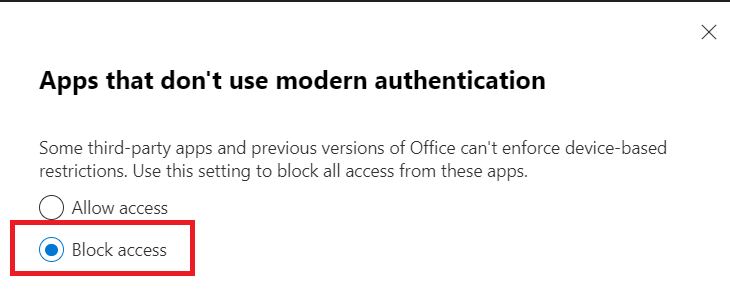
Enabling this setting is very simple, and ensures we are using strong authentication for sessions created by these apps.
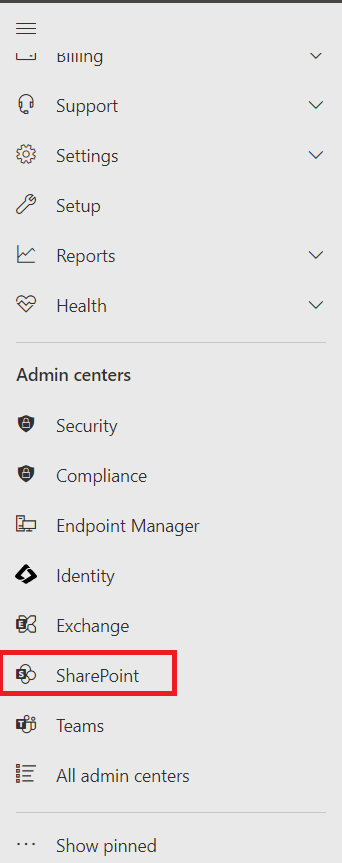
We go to the O365 admin portal at https://admin.microsoft.com/ > SharePoint admin centre > expand “policies” and select “Access Control”.

Select “Block Access” and save our changes.
That’s it, nice and simple.
 @2codemonte